
Markdown
When you export a Blueprint as Markdown, you get a clean text file that describes the whole asset. Here’s what you’ll find in it and how to read each part.
The header
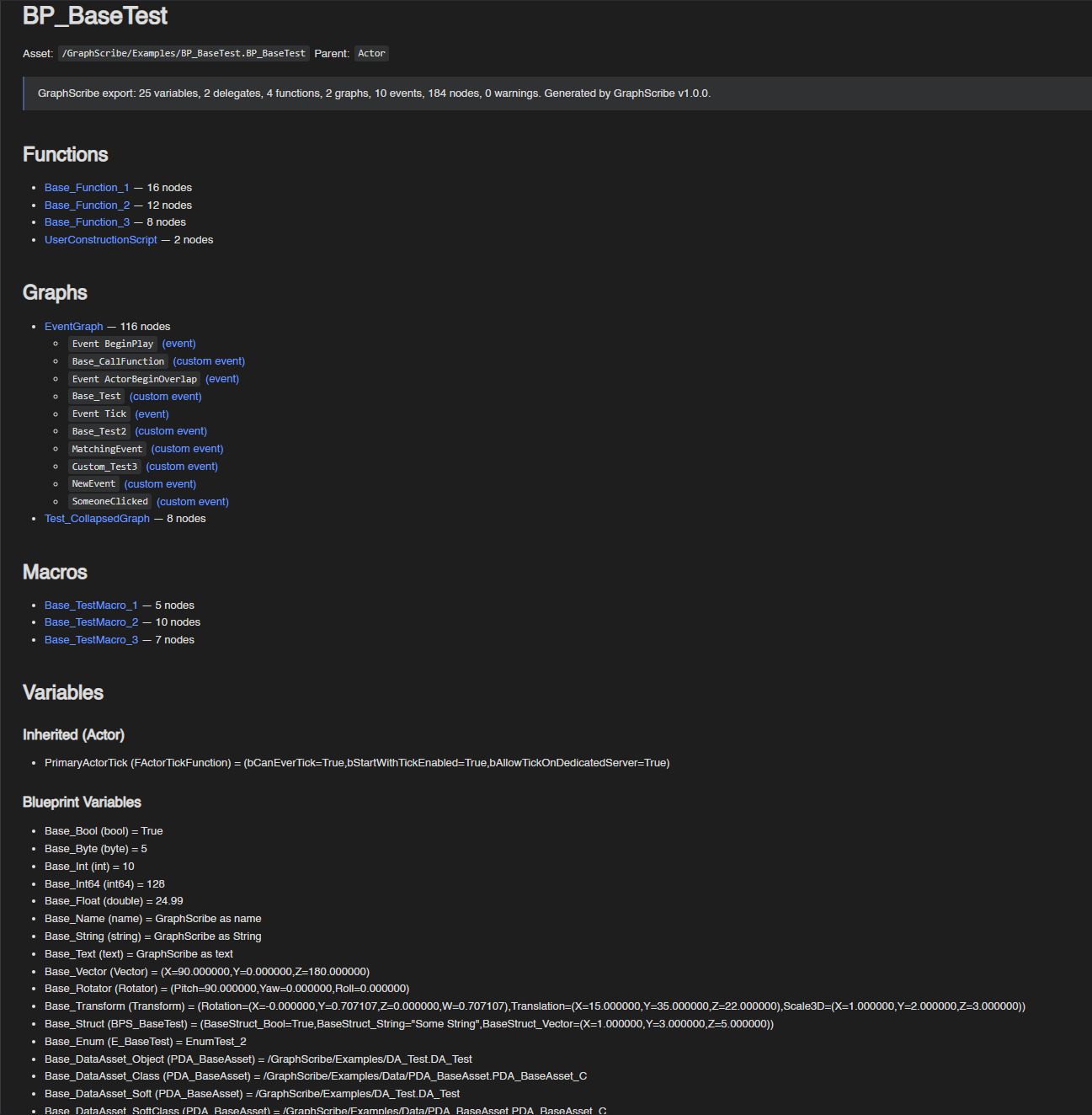
Section titled “The header”Every file starts with the asset’s name, path, and parent class, plus a one-line summary of what was exported:
# BP_BaseTest
Asset: `/GraphScribe/Examples/BP_BaseTest.BP_BaseTest`Parent: `Actor`
> GraphScribe export: 25 variables, 2 delegates, 4 functions, 2 graphs, 10 events, 186 nodes, 0 warnings.> Generated by GraphScribe v1.2.0.
Widget Blueprints and DataAssets add their kind to the header, and DataAssets list their class instead of a parent:
# WBP_Test
Asset: `/GraphScribe/Examples/WBP_Test.WBP_Test`Type: Widget BlueprintParent: `UserWidget`
# DA_Test
Asset: `/GraphScribe/Examples/DA_Test.DA_Test`Type: Data AssetClass: `PDA_BaseAsset_C`Warnings
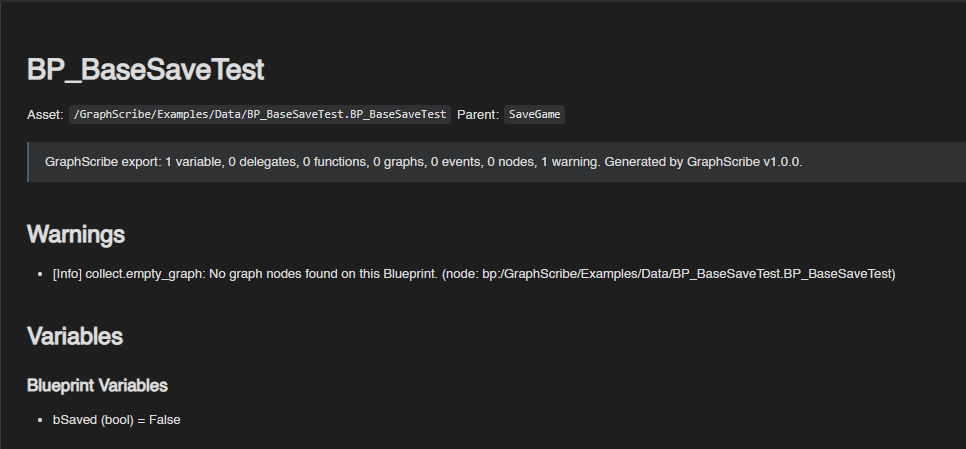
Section titled “Warnings”If the export produced any diagnostics, they appear near the top of the file directly after the summary, or after the Functions/Graphs/Macros index when the asset has graphs with a severity badge:
## Warnings
- [Info] collect.empty_graph: No graph nodes found on this Blueprint. (node: bp:/GraphScribe/Examples/Data/BP_BaseSaveTest.BP_BaseSaveTest)
Badges are [Info], [Warning], or [Error]. The section is omitted entirely when there are no diagnostics.
Section order
Section titled “Section order”The body is organized as: index sections ## Functions / ## Graphs / ## Macros (as present), then ## Variables, ## Delegates, ## Class References, ## Widget Tree (Widget Blueprints only), and ## Animations (Widget Blueprints with animations), followed by the detailed walk of each function/graph/macro.
Index entries link to their section and count their nodes, event graphs also list their events:
## Functions
- [Base_Function_1](#base_function_1) — 16 nodes- [UserConstructionScript](#userconstructionscript) — 2 nodes
## Graphs
- [EventGraph](#eventgraph-graph) — 118 nodes - [`Event BeginPlay` (event)](#event-beginplay-event) - [`Base_CallFunction` (custom event)](#base_callfunction-custom-event)
## Macros
- [Base_TestMacro_1](#base_testmacro_1) — 5 nodes
Variables
Section titled “Variables”The Variables section is a grouped tree, not a flat table. Subsections appear in this order, as present:
### Componentscomponent templates (SCS components and inherited C++ component subobjects), with designer-set template values nested asComponentName.Propertyrows.### Inherited (<ClassName>)one group per ancestor class, reflected property dump rows whose value differs from the direct parent defaults (controlled by the Property Dump Mode).### Blueprint Variablesvariables declared on the Blueprint itself (rendered as### Own Classon DataAssets).
## Variables
### Inherited (Actor)
- PrimaryActorTick (FActorTickFunction) = (bCanEverTick=True,bStartWithTickEnabled=True,bAllowTickOnDedicatedServer=True)
### Blueprint Variables
- Base_Bool (bool) = True- Base_Float (double) = 24.99- Base_Vector (Vector) = (X=90.000000,Y=0.000000,Z=180.000000)- Base_IntArray (TArray<int32>) = (90,101)- Base_DataAsset_Object (PDA_BaseAsset) = /GraphScribe/Examples/DA_Test.DA_Test- DefaultSceneRoot (USceneComponent*) = null- Nested categories render as headings (
#### Game Feature > Actions), containers and structs nest as indented bullets with index paths (PrimaryActorTick.bStartWithTickEnabled), and each leaf isName (Type) = value:
### Inherited (Actor)
- PrimaryActorTick (FActorTickFunction) - PrimaryActorTick.bStartWithTickEnabled (bool) = False- Long values are truncated with
…for readability, and a note at the end of the section points at the JSON format for full values:
> Long values are truncated in the variables tree — export as JSON to view the full values.Class References
Section titled “Class References”Class references found in the CDO / DataAsset properties (e.g. TSubclassOf, TSoftClassPtr) are listed with their
property path and whether the reference is hard or soft:
## Class References
- `Base_DataAsset_Class` → `PDA_BaseAsset_C` (hard)- `Base_DataAsset_SoftClass` → `PDA_BaseAsset_C` (soft)
Widget Tree
Section titled “Widget Tree”Widget Blueprints include the full UMG hierarchy, indented to match the editor:
## Widget Tree
- WBP_Test  - Overlay_16 (Overlay)    - Image_55 (Image)    - HorizontalBox_42 (HorizontalBox)      - Button_46 (Button)        - TextBlock_75 (TextBlock)      - Spacer_111 (Spacer)      - TextBlock_148 (TextBlock)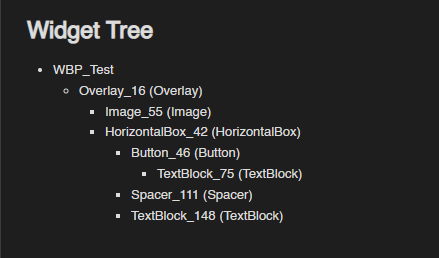
Reading the function walks
Section titled “Reading the function walks”Each function/graph gets its own section. Events and functions use headings like ## Base_Function_1,
## EventGraph (graph) with ### `Event BeginPlay` (event) roots inside. Bound handler events deepen one
heading level per Bind Event nesting.
Each section lists its signature blocks and then walks the graph in execution order:
## Base_Function_2
**Inputs:**
- `(f)NameAsString` (string)
**Locals:**
- `(v)SanitizedString` (string)
**Outputs:**
- `bEmpty` (bool = true)- `SanitizedName` (string)
- #1 Set (v)SanitizedString (SanitizedString = #2 Trim Trailing(SourceString = (f)NameAsString))- #1 --Exec-> #3 For Each Loop (Array = Base_IntArray)  - LoopBody:    - #4 Print String (InString = #5 To String (Integer)(InInt = #3.Array Element))  - Completed:    - #6 Branch (Condition = #7 Is Empty(InString = (v)SanitizedString))      - true:        - #8 Return (bEmpty = true, SanitizedName = null)      - false:        - #9 Return (bEmpty = false, SanitizedName = #10 To Lower(SourceString = (v)SanitizedString))
How to read it:
-
The Inputs: / Outputs: / Locals: blocks list the signature params: inputs as
(f)Name(type), locals as(v)Name(type), outputs asName(type, with the default when one is set). -
The walk is flat for linear chains each line is the next node in execution order, cited by a walk-local id
#N.#2 --Completed-> #3means the exec edge into the Completed pin of a latent node (e.g. Delay), and#8 --break-> #5the exec edge into a loop’s Break pin. -
Multi-output pins (Branch, loops, Switch, Sequence…) indent into nested list items under their pin name:
- Event BeginPlay -> #1 Async Load Game from Slot (latent, SlotName = Slot)- then:- #2 Print String (InString = Loading Save Game)- Completed:- #3 Branch (Condition = #1.bSuccess)- true:- #4 Print String (InString = Save Game Loaded)- false:- #8 Print String (InString = Failed to load save game) -
Call args render inline as
Name = Value, when a call has 3+ args or long values, they wrap onto indented lines. -
Value provenance where a value came from, is shown with compact chains and cites:
- variables as their name (
Base_IntArray), function inputs as(f)NameAsString, locals as(v)SanitizedString, - already-walked producers as
#N.Pin(e.g.#1.bSuccess,#3.Array Element), - pure producers expanded as chains (
Base_Struct->#2 Break BPS Base Test->BaseStruct_Bool), - re-entries into an already-walked node as
(reenter).
- variables as their name (
-
Operators render every input pin they have, including the extra pins an Add Pin node grows:
- arithmetic flattens to one infix chain in pin order, which matches the engine’s left-to-right
evaluation (
(#2 GetCount(...) + #3 GetBonus(...) + #4 GetPenalty(...))), - boolean AND/OR and comparisons keep their labeled operand slots
(
AND Boolean (A: #2 IsA) (B: #3 IsB) (C: #4 IsC)).
- arithmetic flattens to one infix chain in pin order, which matches the engine’s left-to-right
evaluation (
-
Returns render as
#8 Return (bEmpty = true, SanitizedName = null)with unset outputs asnull. Latent nodes are marked(latent), and loops/push pins use their own branch headers (e.g.- LoopBody:,- After Push:).
Values are compact by design so long pin trees stay readable. For the exact machine data (every node, pin, edge, and default), use the JSON format instead. For a picture of the flow, use Mermaid. Think of Markdown as the spec.