
How I Use AI With Unreal Engine Blueprints Without Burning Tokens
On this page
Quick summary
- Most AI-agents-for-games advice ends with “use Unity or Godot”, because their scripts are plain text an LLM can read and write. Unreal Blueprints are binary
.uassetfiles, which an agent can only read by reverse engineering the package format, at a token cost that makes it impractical. The problem is not the engine, it is the file format.- Epic’s experimental Unreal MCP plugin lets any AI agent drive the editor, but it has a hidden bill: every tool call dumps verbose node and pin data into the context window, and a frontier model pays for all of it, on every turn.
- My fix is to split the work. An expensive model reads a GraphScribe export and writes a Markdown spec. A cheap, even local, model executes that spec over Unreal MCP and validates its own work by exporting the Blueprint again and comparing it to the spec.
- Result: the smart model makes roughly one call per feature instead of hundreds of tool-calling turns, the loop that iterates is nearly free, and the work is verifiable instead of hopeful.
I build games in Unreal Engine, and I use AI to help me do it. Every time I say that publicly, someone tells me I picked the wrong engine.
The advice is always the same: if you want AI to build your game, use Unity or Godot. Their code is text, C# and GDScript, and large language models are very good at text. Unreal is the wrong choice because Blueprints are binary files an AI cannot read, and Unreal C++ is a fight you do not need to have.
That advice is not stupid. It is just aimed at the wrong problem.
The real problem is not the engine, it is the file format
An AI agent cannot read a Blueprint the way it reads code. A Blueprint is a .uasset, a binary package holding nodes, pins, wires, defaults, and component templates. Your agent can open the file, and there is nothing in it for the agent to read. It cannot grep it, diff it, review it in a pull request, or answer “who calls this function?”.
Strictly speaking, “cannot” is too strong, and I should be honest about that. The package format is documented well enough to reverse engineer: name tables hold plain strings, K2 node classes carry recognisable names like K2Node_CallFunction, properties use the engine’s tagged serialization, pin links are GUID references you can resolve, and the compiled function bytecode sitting in the package can be disassembled. Plugins and standalone parsers exist that do exactly that, which is how you can inspect a Blueprint without opening the editor.
So an agent can read a Blueprint, if you are willing to pay for it. It has to infer structure from hex dumps and GUID cross-references, version by version, file by file. A 200 KB Blueprint becomes roughly a megabyte of hex before the model can start reasoning, and it pays that cost again every time it re-reads the graph. That is a research project, not a workflow you can run fifty times a day.
Which is the real point: the information is not locked away, it is just expensive enough to unlock that it never pays for itself inside a normal task.
Unity and Godot do not solve AI-assisted development. They just happen to store gameplay logic in a format that was already text, so nobody had to solve anything.
Change the format, and the argument disappears. That is what GraphScribe does: it exports Blueprints, Widget Blueprints, and DataAssets into Markdown, Mermaid, JSON, an Obsidian vault, and Graphify, which is a project-wide knowledge graph of how your Blueprints call each other. Your graphs stop being binaries and become text an agent can actually read.
With that in place, Unreal stops being the hard case. It becomes a case with a bridge.
What Epic shipped, and the catch
Epic’s Unreal MCP plugin (still marked experimental in UE 5.8) embeds an MCP server inside the editor process. Any MCP-compatible agent, Claude Code, Cursor, VS Code, Codex, Gemini, connects to http://127.0.0.1:8000/mcp and starts calling tools: spawn actors, configure lighting, create material instances, inspect Slate widgets, run automation tests. One console command writes the client config for you:
ModelContextProtocol.GenerateClientConfig ClaudeCodeIt is genuinely good, and it is the missing piece that made “AI does Unreal work” possible instead of theoretical. I use it every day now.
But it has a structural flaw, and it is not a bug anyone can patch: MCP is chatty, and chat is billed by the token.
Here is what actually happens when you ask a frontier model to “add a coin pickup Blueprint” through MCP alone:
- The agent loads tool schemas so it knows what it can call.
- It calls a tool to find the asset, which returns a list.
- It calls a tool to read the graph, which returns nodes with GUIDs, pin arrays, defaults, and metadata as JSON.
- It decides on one small change, then calls a tool to make it.
- It re-reads the graph to check, and the full JSON comes back again.
- It repeats that loop until the graph looks right.
Every one of those tool results stays in the context window for the rest of the conversation, and the whole conversation is re-sent on every turn. A task a human would finish in four minutes becomes thirty tool calls, each one carrying data the model already saw. Tool calls also run serially on the game thread, so the agent cannot even parallelize the loop away.
None of this matters if you are using a cheap model. It matters enormously when the only model that can reason about a messy graph is the expensive one, because you are paying frontier prices to re-read the same pin dumps over and over.
The fix: stop paying a genius to move wires
The insight is simple. Deciding what a graph should be is hard and worth a smart model. Typing that decision into the editor is mechanical, and mechanical work belongs to a cheap model.
So I split the job:
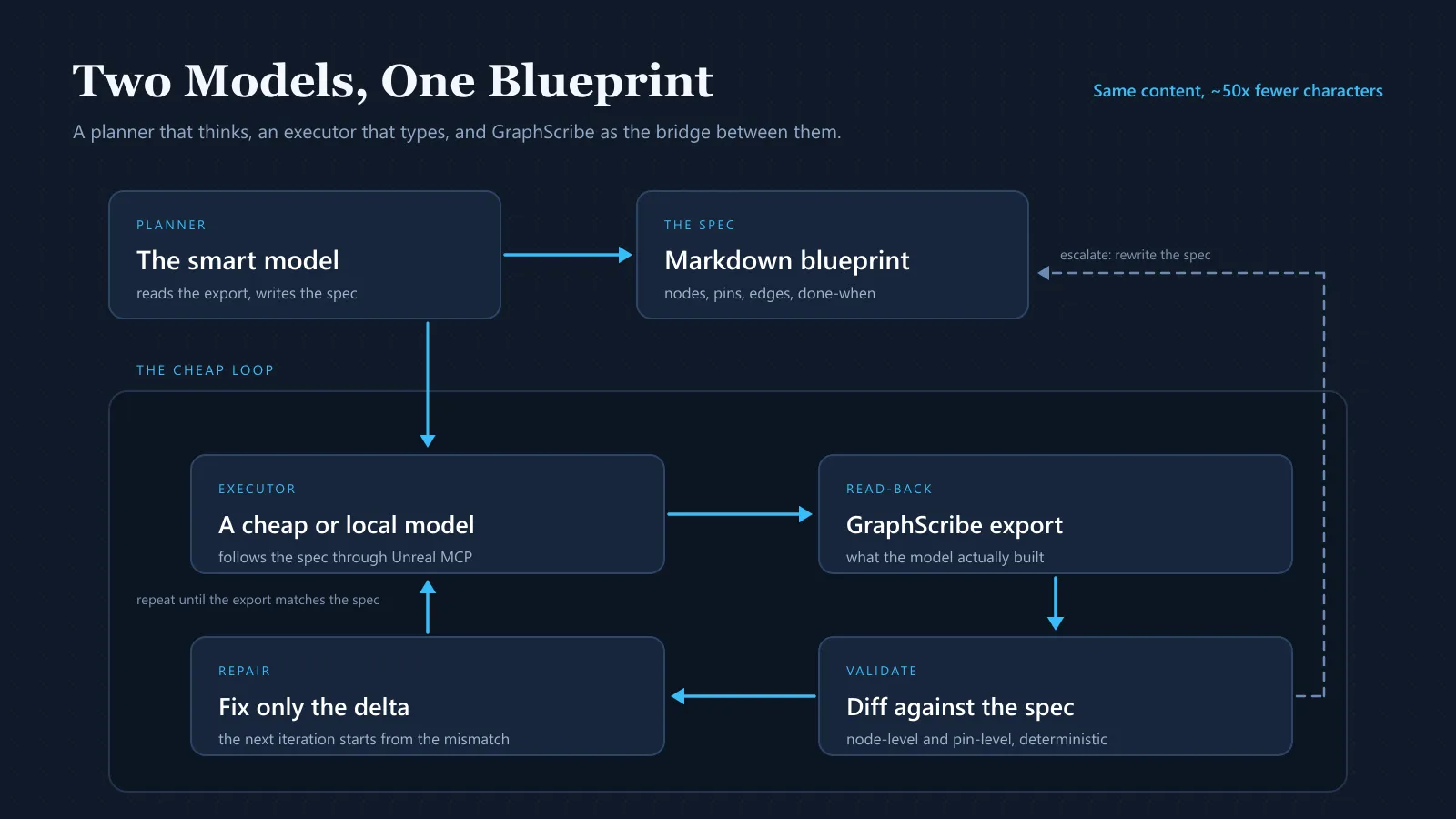
- The smart model never touches MCP. It reads a GraphScribe export and writes a spec. That is one large, high-value call per feature.
- The cheap model never designs anything. It follows the spec, calls MCP, then exports the result and checks it against the spec.
- GraphScribe is the bridge in both directions: the export the planner reads, and the read-back the executor validates against.
My folder layout is boring on purpose:
Docs/AI/ Exports/ <- folder batch export from GraphScribe (Markdown + Graphify) Specs/ <- the smart model writes one spec per task here Reports/ <- the executor writes its validation result hereThe workflow, step by step
Step 1: Export the Blueprint so the smart model can read it
Right-click the content folder that owns the feature, choose Export Blueprints with GraphScribe…, set the format to Markdown and include subfolders, and point the output at Docs/AI/Exports. You get one clean text file per Blueprint: variables, components, events, functions, and a walk of every graph in execution order with pins and values inline. Run it again with Graphify and you also get ProjectLinkage.graphify.json, one file describing which Blueprint calls which function and uses which class across the whole project. Both are covered in Ways to Export.
This step is where the cost saving is born. The same Blueprint that an agent would accumulate node by node through MCP tool results, GUIDs, pin arrays, and JSON envelopes included, arrives as a compact document. On the graphs I have measured, the Markdown export that fully describes a graph is roughly 50x smaller in characters than the data an agent pulls to understand the same graph through MCP calls. Same content, a fraction of the context. (Do not take my number: export one of your own graphs, count the characters, then ask an agent to describe the same graph over MCP and count what comes back. The ratio is the whole business case, so it is worth checking once.)
Step 2: The smart model writes a spec, not code
The expensive model gets one prompt: here is the export, here is what I want, write the spec. The spec is not vague prose. It is a plan precise enough that a mediocre model cannot get it wrong, written in the vocabulary Unreal already uses:
# Spec: BP_CoinPickup
Target asset: /Game/Gameplay/Pickups/BP_CoinPickupParent class: BP_PickupBaseBaseline export: Exports/Markdown/Gameplay/Pickups/BP_CoinPickup.md
## Variables to add
- CoinValue (int32) = 10, Instance Editable, Category "Pickup"- bCollected (bool) = false, Private
## EventGraph
### Event BeginPlay
- #1 Set (v)bCollected = false- #2 --Exec-> Play Sound at Location (Sound = S_Pickup, Location = GetActorLocation)
### Event ActorBeginOverlap (OtherActor)
- #3 Cast To BP_PlayerCharacter (Object = OtherActor)  - As BP_PlayerCharacter:    - #4 Call AddCoins (Amount = (v)CoinValue)      - then -> #5 Set (v)bCollected = true      - then -> #6 Destroy Actor (Target = Self)
## Done when
- The export contains exactly these nodes with these pins and this order.- AddCoins is called with the CoinValue variable, not a literal.- No orphan nodes, no unconnected exec pins, no compile warnings.- The re-export diff shows no other graph changed.
That example is close to real output, and it is exactly the shape a GraphScribe Markdown export uses, so the executor never has to translate between two notations.
Notice what the smart model did not do: it did not open a socket, call a tool, or re-read a graph. It thought once, wrote a file, and stopped. I review that file in two minutes, which is the other half of the win. Reading a spec is cheap; auditing three hundred tool calls is not.
Step 3: A cheap model executes it over MCP
Now the executor. Any model that can follow instructions and call tools will do: a small local model through Ollama, or the cheapest hosted model you can find. It needs no architectural judgement, because the thinking is already done and written down.
Its prompt is short:
Read Docs/AI/Specs/BP_CoinPickup.md and build it using Unreal MCP.Follow the spec exactly. Do not invent node or function names.If a node in the spec does not exist, stop and write the problem to Reports/.This is the part people find hard to believe, so it is worth being blunt about why it works: the task is no longer “design a pickup system”. It is “create these variables, place these nodes, connect these pins”. That is transcription plus tool calls, and small models are fine at it when the spec is deterministic.
Step 4: The executor validates its own work with the same bridge
An agent that cannot check its own work is a liability at any price. This is where the loop closes, and it is my favourite part of the setup.
The executor is told that the task is not done when it thinks it is done. The task is done when the export matches the spec:
1. Re-export BP_CoinPickup with GraphScribe to Docs/AI/Exports/.2. Compare it against the spec: nodes, pins, values, order.3. Write the result to Reports/BP_CoinPickup.md.4. If anything does not match, fix only that difference and repeat.Because GraphScribe gives the graph a readable form, the check is a text comparison rather than a judgement call, and Graphify’s stable IDs (bp:, fn:, evt:, cls:, see Graphify: AI-Ready Graphs) mean the comparison survives re-exports: the same function keeps the same ID tomorrow, so a diff means a real change and not a reshuffled file.
In practice the executor runs three to six iterations on a medium graph, each one costing almost nothing, and stops when the export matches. When it cannot match, it does not guess. It writes what is missing to Reports/, and I read that instead of a 400 line chat log.
Step 5: Escalate only when the plan was wrong
Sometimes the spec is the problem: the node the planner asked for does not exist, or the parent class cannot do what the spec assumes. That is the one case where the smart model comes back, and it comes back cheaply, because I hand it three things: the spec, the current export, and the executor’s report. It rewrites section of the spec that was wrong. No frontier model ever sits in a tool-calling loop.
What this actually changes
| Dimension | Smart model over MCP only | GraphScribe bridge |
|---|---|---|
| Context per task | Tool schemas plus full JSON graph dumps, re-sent every turn | One Markdown export plus one Graphify graph, read once |
| Who iterates | The expensive model | The cheap or local model |
| Cost curve | Tokens x turns x frontier price | One planning call plus near-free loops |
| Validation | “The agent said it worked” | Export diffed against the spec |
| Failure mode | Expensive retries and silent drift | A precise mismatch written to a report |
The speed is a side effect worth mentioning. Folder exports take seconds, the executor loop is short, and the planner is not waiting on thirty round trips. On features I have built both ways, the bridged version finishes faster, mostly because it stops re-reading things it already knows.
Lessons that make this work
- Make the spec boringly explicit. Node names, pin names, values, order. Ambiguity is the only thing a small model cannot handle.
- One Blueprint per task. Multi-asset specs are where cheap models start improvising.
- Never let the executor invent API. Put it in the prompt, and make the validation step catch it.
- Define “done” as something an export can prove. If you cannot write the check, the task is not ready.
- Keep exports in version control. Committing
Docs/AI/Exportsturns “changed a binary file” into a readable diff, which is how you review AI work without reading chat logs. - Re-export before every iteration. Stale exports are how an agent “fixes” something that is already correct.
- Use JSON when you need exactness. Markdown is the spec, JSON is the machine truth when a pin value really has to match.
- Cheapest model that passes the check, not the cheapest model that exists. Upgrade only the step that keeps failing.
Why I still pick Unreal
If your goal is to ship a small 2D game this month and you have no Unreal experience, use Godot. I am not going to pretend otherwise.
But if your goal is to ship a game in the engine you already know, with the rendering, animation, networking, and console support you actually need, then “AI works better with text” is not a reason to throw that away. It is a reason to make your engine produce text. Blueprints are the only part of Unreal that was ever truly opaque, and that part is solved by exporting them. Everything else in Unreal, C++, configs, data assets, build scripts, was already text, and agents handle it the same way they handle any other codebase.
The people telling you to switch engines are optimising for the demo. I am optimising for the project I have to maintain for the next three years.
FAQ
Does Unreal MCP really burn tokens that fast?
On its own, yes, for anything graph-shaped. Each tool result enters the context window and stays there for the rest of the session, and the whole conversation is re-sent every turn, so a task with many small calls and verbose JSON results is expensive even when the model is doing very little thinking. The fix is not fewer tools, it is putting the graph into the context once, in a compact form, instead of rebuilding it call by call.
Can a small local model really build Unreal Blueprints?
It can execute a precise spec through MCP, yes. It cannot design a system, and it should not be asked to. The workflow above is designed around that limit: the smart model decides, the cheap model types, and the export comparison decides whether the typing was right.
Do I need GraphScribe for this workflow?
You need something that turns Blueprints into text your agent can read and diff. That is the entire bridge. GraphScribe is what I built for it, because I wanted the export to be one click, to include widget trees and DataAssets, and to produce a project-wide graph instead of fifty unrelated files. The FAQ page covers what it does and does not do.
Does this work for C++ as well as Blueprints?
Yes, and C++ is easier. Your source is already text, so the planner can read it directly and the executor patches files. The bridge only earns its keep for Blueprint graphs, DataAssets, and widget trees, which is exactly the part of Unreal that agents otherwise cannot see without reverse engineering the package format.
What if the cheap model gets stuck in a loop?
Cap the iterations in the prompt, three to six is usually enough. When the cap is hit, the executor writes the mismatch to Reports/ and stops. A stuck loop that costs pennies and produces a clear failure report is a much better outcome than an expensive model improvising for twenty minutes.
Is this worth setting up for a small project?
It pays for itself the first time you change a system you built a month ago. The exports are the documentation, the specs are the change requests, and the validation loop is the review. That is useful whether or not an AI is doing the typing.
Try it
Install GraphScribe from Fab, enable Epic’s Unreal MCP plugin, and export one feature folder. Then ask your smartest model to write a spec from that export, and let the cheapest model you trust try to build it. If the export matches the spec at the end, you have the workflow.
If you are new to Unreal and AI, start with Why New Unreal Engine Developers Should Use GraphScribe and What is GraphScribe?. If you want the technical detail of what an export contains, read the Markdown and Graphify format pages, and the schema reference if you plan to validate exports with your own script.
The engine was never the problem. The file format was. Fix the format and Unreal becomes one of the better places to work with AI, because the graphs finally say what they mean.
Keep reading
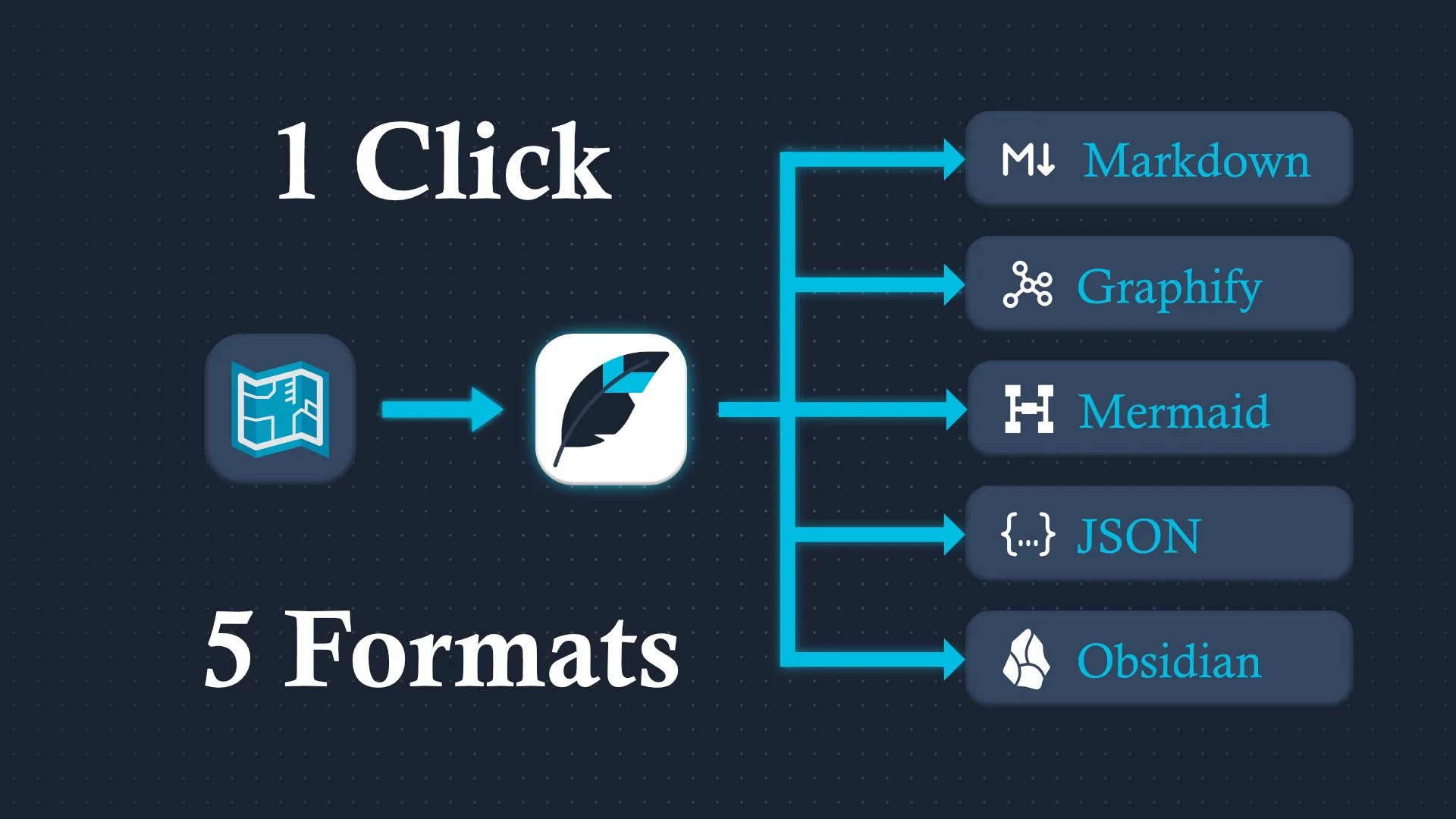
Why New Unreal Engine Developers Should Use GraphScribe
Your Blueprints are binary files. GraphScribe turns them into readable Markdown, diagrams, and AI-ready graphs, so you can read, share, and document your UE5 projects like a senior dev.
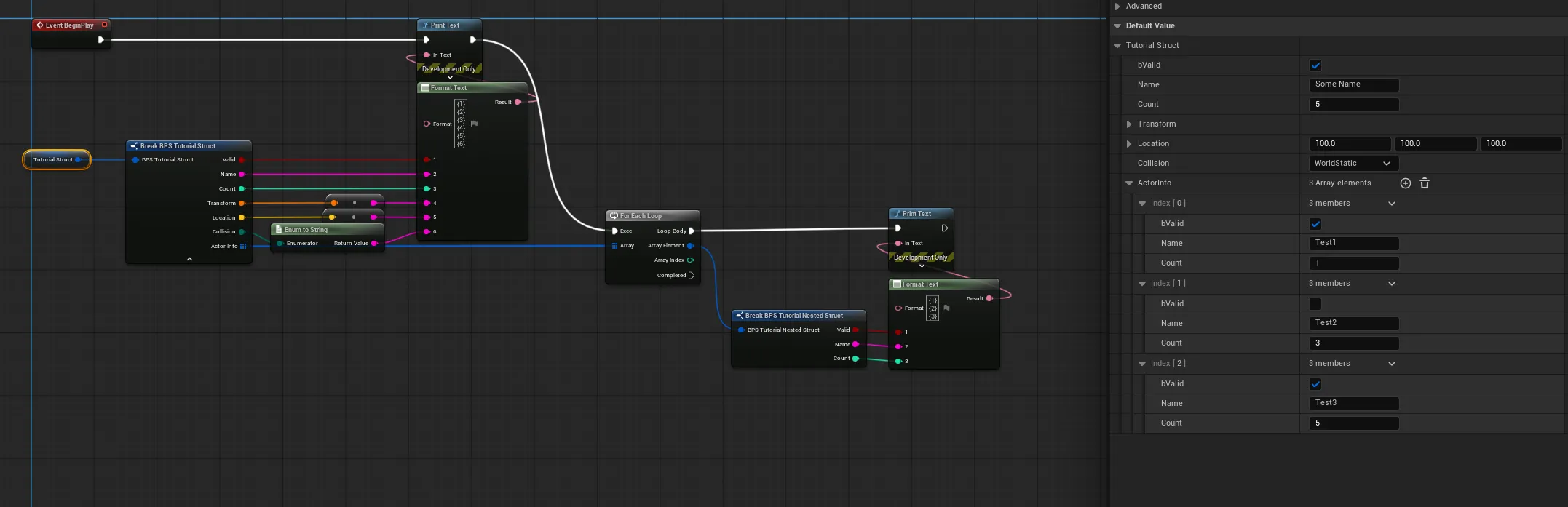
How to Create a Generic Struct-to-JSON Converter Node
Convert any Unreal Engine Struct into a clean, readable JSON string with a single Blueprint node, no more manual FormatText debugging.